How to Give Claude Code Memory That Follows You Across Tools?
Claude Code remembers your project, but only on one machine. Walrus Memory makes agent memory portable across Codex, Cursor, and your own agents.

Portable agent memory travels with an AI agent across sessions, tools, and runtimes, rather than staying locked to the app that created it. Walrus Memory is a portable memory layer for AI agents: an agent saves a fact once and recalls it from any client signed in to the same account.
In this article
Key takeaways
- Claude Code already remembers across sessions through CLAUDE.md for rules you write and auto memory for what it learns, but that memory stays inside Claude Code.
- Walrus Memory installs into Claude Code in 2 commands. Ask the agent to remember or recall, and it stores and retrieves portable memory for you with no files to manage.
- You can read the same memory in Codex, Cursor, and your own SDK, with no export and no file to copy.
- Memory lives in a namespace tied to your account, not the client, so recall returns the same results everywhere. Nothing is shared by default.
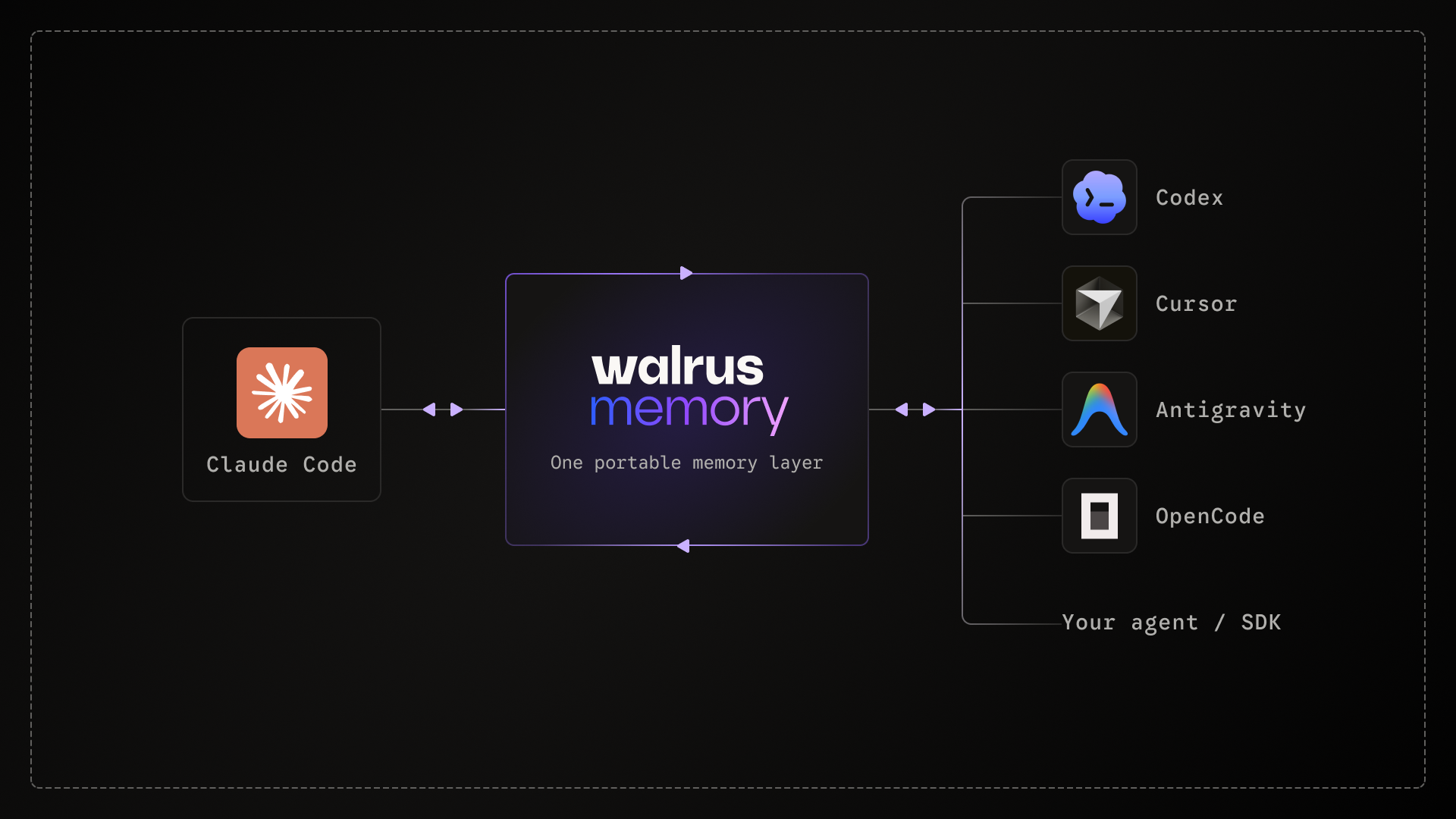
Claude Code remembers your project through CLAUDE.md for the rules you write and auto memory for what it picks up as you work, but that memory stays inside Claude Code. Walrus Memory, a portable memory layer for AI agents, gives Claude Code memory that persists across sessions and moves with you to other tools. Add it in 2 commands, and you can read the same memory in Codex, Cursor, Antigravity, or your own agent.
How does Claude Code remember between sessions?
Claude Code has two memory systems, both loaded at the start of every session: CLAUDE.md, the rules and conventions you write by hand, and auto memory, notes Claude writes itself as it learns your build commands, debugging quirks, and preferences. Auto memory is on by default, so the caveats you hit mid-session, the fix that finally worked, the approach you ruled out, get saved automatically, without you writing anything.
Persistence inside Claude Code is largely handled. The limit is where that memory lives. Auto memory is machine-local and per-repository: it isn't shared across machines or cloud environments, and it never leaves Claude Code. You could work around this, point auto memory at your repo and commit it, but now your memory is a file in version control: visible to everyone with repo access, conflicting like code, and still stuck inside Claude Code. Open the same project in Codex, hand work to an agent on your own SDK, or move to another machine, and none of it comes with you.
Every tool that starts from zero pays the relearning cost again, what Khala's research on agent memory calls agentic memory debt.
Why does your agent's memory get trapped in one tool?
Because it belongs to the tool, not to you. Claude Code's auto memory automatically saves what you learn, but only to this machine and this repo. If you only ever work in Claude Code on one machine, that may be enough. To sync it across machines, you'd have to commit it to your repo, where anyone with access can see it. Walrus Memory carries your memory across machines and tools while keeping it private to you.
Some tools can import Claude Code's setup. Codex, for instance, may offer to pull in your existing CLAUDE.md when you configure it. But that's a one-time copy. Each tool ends up with its own snapshot that drifts the moment you keep working: what one learns, the others never see. So you're back to re-syncing and re-explaining, one level up.
That's what portable agent memory is: memory the tool doesn't own. Your agent carries it wherever you work.
How does portable memory work across tools?
Walrus Memory ties your memories to your account, not to any one client. Sign in from any tool and it recalls the same memories. You decide what's saved and what's shared. Nothing is shared by default. Because the memory lives outside the tool, portability isn't a setting you switch on. It's where the memory already is.
Watch the 2-minute setup: memory written in Claude Code, recalled in Codex.
How to add Walrus Memory to Claude Code?
- Install Walrus Memory into Claude Code in two commands:
/plugin marketplace add MystenLabs/MemWal
/plugin install memwal@memwal-plugins
- Restart Claude Code. On first use the agent runs memwal_login, which opens a browser sign-in to connect your account. That's it. From here the agent handles memory on its own. Tell it something durable and it saves it:
You: I prefer pnpm and always use TypeScript strict mode.
Agent: (calls memwal_remember to store both facts)
One thing to know: the Walrus Memory plugin takes over from Claude Code's built-in auto memory. Instead of Claude quietly saving notes on your machine, you tell it what's worth remembering and it stores that in portable memory, saving and recalling through the plugin's hooks. You trade a bit of Claude Code's automatic local note-taking for memory you own and can carry anywhere.
- Start a fresh session and it recalls what's relevant before acting:
You: set up a new package in this repo
Agent: (calls memwal_recall, finds your preferences)
Scaffolding with pnpm and "strict": true, matching how you work.
Two operations do the work: memwal_remember saves a durable fact, memwal_recall searches your stored memories for what matters now. The plugin adds lifecycle hooks that prompt the agent to recall at session start and save when you state something worth keeping, so you don't manage it by hand.
Full steps are in the Walrus Memory Claude Code quickstart.
How to read the same memory in Codex and other tools?
You add Walrus Memory to any other tool and sign into the same account. Set up Walrus Memory in Codex, start a session, and ask it to pick up your project.
It calls memwal_recall against the same memories, the decisions you saved while working in Claude Code. Nothing to export, no file to copy. The memory is portable because it doesn't belong to the tool. It belongs to you.
That holds across surfaces, not just command-line tools. The same memory an agent writes in the terminal is readable from a desktop app, and from tools like Cursor.
The pattern repeats: the tool changes, the memory stays.
Give Claude Code portable memory
Your next session doesn't have to start from zero. Add Walrus Memory to Claude Code, and the context you build stays with you, across sessions and across every tool you work in.
Sign in to Walrus Memory, install the plugin in two commands, and you're set.
Building something with portable memory? Join our builder Discord to compare setups, ask questions, and tell us what to ship next.
FAQs
Does Claude Code memory work across other tools like Codex or Cursor?
Claude Code memory works across other tools only when the memory lives outside Claude Code. On its own, Claude Code persists memory locally through CLAUDE.md and auto memory, useful for stable facts and things it learns as you work, but that memory doesn't move to Codex, Cursor, or your own agents. Walrus Memory stores memory in a namespace tied to your account, so signing in from any of them recalls the same memories.
Set it up for Claude Code, Codex, Cursor, or Antigravity.
How do AI coding assistants remember a codebase across sessions?
By carrying what they learn beyond the session. Claude Code already does this locally, with CLAUDE.md for rules and auto memory for what it learns as you work, but that memory stays on one machine and doesn't move to other tools. A portable memory layer for AI agents keeps it durable and portable instead: with Walrus Memory you tell the agent what's worth remembering, and it saves with memwal_remember and retrieves with memwal_recall from Claude Code, Codex, or Cursor alike. See the Claude Code quickstart.
How can I make my agent's memory portable across apps?
Store memory in a place the app doesn't own. Walrus Memory keeps memories in a namespace tied to your account, so any signed-in client – Claude Code, Codex, Cursor, or your own SDK – recalls the same memories with no export step. More on portable agent memory on the Walrus Memory product page.
What's the difference between the context window and memory in LLMs?
The context window is what the model has loaded in a single call – finite and temporary. Memory is what persists across sessions and can be recalled later. A portable memory layer for AI agents gives you the second without depending on the size of the first. More: long-term memory for AI agents.
About Walrus Memory
Walrus Memory is a portable memory layer for AI agents. It enables agents to operate reliably across apps and sessions without losing context – portable, verifiable, and fully under builders' control. Walrus Memory lets agents handle complex, long-running workflows and coordinate using data they can trust.