
Getting Started with Dartus: Store and Retrieve Data on Walrus Using Dart & Flutter
A step-by-step guide to using Dartus, the native Dart and Flutter SDK for Walrus. Upload, retrieve, and manage blobs without dropping into raw HTTP.

If you’re a Dart or Flutter developer, Dartus - a Walrus RFP project built by Dominion - gives you a native SDK to store, retrieve, and manage data on Walrus without leaving the Dart ecosystem. Built so developers can access Walrus without dropping into raw HTTP or switching languages just to get started, Dartus supports three operating modes: a simple HTTP path, a wallet-aware relay mode, and a direct mode that handles client-side erasure coding via Rust FFI for full protocol control.
This tutorial walks you through the basics: setting up Dartus, uploading your first blob via HTTP mode, reading it back, and then leveling up to direct mode with wallet-signed transactions. By the end, you’ll have a working Flutter app that stores and retrieves files on decentralized storage. If you're building Flutter apps that need decentralized storage, whether that's a media sharing app, a wallet-integrated dApp, or anything that stores user-generated content on-chain, Dartus gives you a native way to do it.
Why Dartus?
Walrus gives you decentralized storage, but the protocol speaks HTTP endpoints and Sui transactions, not Dart. Without Dartus, you'd be wiring up raw REST calls, manually handling erasure coding, and building your own retry logic around storage node failures. Dartus wraps all of that into a native SDK with three operational modes that scale with your needs, from a zero-config HTTP client to full client-side erasure coding with Rust FFI.
What You’ll Learn
- How to install and configure Dartus
- Uploading and downloading blobs using HTTP mode (the simplest path)
- Estimating storage costs before writing
- Reading blobs directly from storage nodes
- Writing blobs with wallet-signed transactions (direct mode)
- Packing multiple files into a single quilt blob
- Error handling patterns for production apps
Prerequisites
- Flutter SDK >= 3.35.0 (required — Dartus depends on Flutter transitively through the sui package)
- Basic familiarity with Dart async/await patterns
- A code editor (VS Code, IntelliJ, etc.)
No blockchain or Sui experience is required for HTTP mode. Direct mode sections assume basic familiarity with wallet concepts (keys, signing transactions).
Installation
HTTP Mode (No Wallet Needed)
If you just want to upload and download blobs through a publisher/aggregator, you only need the core package:
# pubspec.yaml
dependencies:
  dartus: ^0.2.0
Direct Mode (Wallet Integration)
For signing transactions with a user’s wallet, add the Sui SDK:
# pubspec.yaml
dependencies:
  dartus: ^0.2.0
  sui: ^0.3.7
Then install:
flutter pub getThat’s it for most use cases. Direct mode optionally supports a native Rust library (libwalrus_ffi) for client-side erasure coding, which gives you the best performance. We’ll cover that setup later — the SDK works without it using an upload relay.
Your First Upload (HTTP Mode)
HTTP mode is the fastest way to get blobs on Walrus. You send data to a publisher (which handles the erasure coding and storage-node interaction), and read it back through an aggregator. The publisher operator pays the storage costs — on testnet, this is free.
Create a Client
import 'package:dartus/dartus.dart';

final client = WalrusClient(
  publisherBaseUrl: Uri.parse(
    'https://publisher.walrus-testnet.walrus.space'),
  aggregatorBaseUrl: Uri.parse(
    'https://aggregator.walrus-testnet.walrus.space'),
  useSecureConnection: true,
);
Note: `useSecureConnection: true` enforces TLS certificate validation. For testnet with community endpoints, you may need to set this to `false` if you encounter certificate issues.
Upload Bytes
import 'dart:convert';
import 'dart:io';
import 'dart:typed_data';

void main() async {
  final client = WalrusClient(
    publisherBaseUrl: Uri.parse(
      'https://publisher.walrus-testnet.walrus.space'),
    aggregatorBaseUrl: Uri.parse(
      'https://aggregator.walrus-testnet.walrus.space'),
    useSecureConnection: true,
  );

  // Upload a simple text blob
  final data = Uint8List.fromList(
    utf8.encode('Hello, Walrus! This is my first blob.'),
  );
  final response = await client.putBlob(data: data);

  final blobId =
    response['newlyCreated']?['blobObject']?['blobId']
      ?? response['alreadyCertified']?['blobId'];

  print('Blob ID: $blobId');
  await client.close();
}
The response is a JSON map. If the exact same bytes were already stored on Walrus, you’ll get alreadyCertified — content-addressable storage means you don’t pay twice for the same data.
Upload from a File
For larger files, you can upload directly from disk:
final file = File('photo.png');
final response = await client.putBlobFromFile(file: file);
For very large files, use streaming to avoid loading the entire file into memory:
final response = await client.putBlobStreaming(
  file: File('large-video.mp4'),
);
Download a Blob
final blobId = 'YOUR_BLOB_ID_HERE';

// Returns raw bytes
final bytes = await client.getBlob(blobId);
print('Downloaded ${bytes.length} bytes');

// Or save directly to a file
await client.getBlobAsFile(
  blobId: blobId,
  destination: File('downloaded-photo.png'),
);
Downloads are cached to disk automatically. Subsequent calls for the same blob ID skip the network entirely and load from the local cache.
Understanding What Happened
When you uploaded that blob, here’s what happened under the hood:
1. Your bytes were sent to the publisher over HTTP
2. The publisher performed erasure coding (Walrus uses a scheme called Red Stuff) — splitting your data into encoded slivers
3. Those slivers were distributed across Walrus storage nodes
4. A Sui transaction was submitted to register and certify the blob on-chain
5. You got back a blob ID — a content-addressable identifier derived from the data itself
When you downloaded the blob:
1. Your request hit the aggregator
2. The aggregator fetched enough slivers from storage nodes to reconstruct the original data (erasure coding means it doesn’t need all slivers — just a threshold)
3. The decoded bytes were returned to you
The key insight: the publisher/aggregator model is a convenience layer. In direct mode, your app does the erasure coding and storage-node communication itself.
Enabling Logging
Before we go deeper, let’s turn on logging so you can see what’s happening:
final client = WalrusClient(
  publisherBaseUrl: Uri.parse(
    'https://publisher.walrus-testnet.walrus.space'),
  aggregatorBaseUrl: Uri.parse(
    'https://aggregator.walrus-testnet.walrus.space'),
  useSecureConnection: true,
  logLevel: WalrusLogLevel.info,
);
Log levels, from least to most verbose:
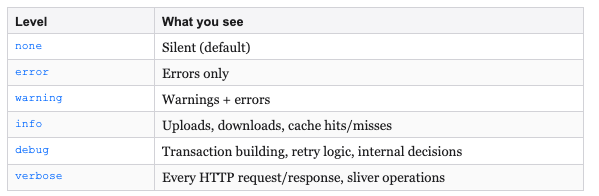
You can also route logs to your own system:
final client = WalrusClient(
  // ...
  logLevel: WalrusLogLevel.info,
  onLog: (record) {
    myLogger.log(record.level.name, record.message);
  },
);
Direct Mode — Reading from Storage Nodes
Direct mode lets your app talk to storage nodes without going through a publisher/aggregator. Let’s start with reads, which don’t require a wallet.
import 'package:dartus/dartus.dart';

void main() async {
  final client = WalrusDirectClient.fromNetwork(
    network: WalrusNetwork.testnet,
  );

  final data = await client.readBlob(blobId: 'YOUR_BLOB_ID');
  print('Read ${data.length} bytes from storage nodes');

  // Or get a high-level handle
  final blob = await client.getBlob(blobId: 'YOUR_BLOB_ID');
  final file = blob.asFile();
  final bytes = await file.bytes();
  final text = await file.text();

  client.close();
}
WalrusNetwork.testnet and WalrusNetwork.mainnet come pre-configured with the correct Sui package IDs and network parameters — you don’t need to look anything up.
Direct Mode — Writing with a Wallet
To write blobs in direct mode, you need a Sui wallet to sign transactions. The user’s wallet pays the SUI gas and WAL storage costs.
Estimate Costs First
Always check the cost before writing:
final cost = await client.storageCost(1024 * 1024, 3);
print('Storage: ${cost.storageCost} WAL');
print('Write:   ${cost.writeCost} WAL');
print('Total:   ${cost.totalCost} WAL');
Simple Write
import 'package:dartus/dartus.dart';
import 'package:sui/sui.dart';
import 'dart:convert';
import 'dart:typed_data';

void main() async {
  final client = WalrusDirectClient.fromNetwork(
    network: WalrusNetwork.testnet,
  );

  final signer = SuiAccount.fromMnemonics(
    'your twelve word mnemonic phrase goes here ...',
    SignatureScheme.Ed25519,
  );

  final result = await client.writeBlob(
    blob: Uint8List.fromList(
      utf8.encode('Hello from direct mode!')),
    epochs: 3,
    signer: signer,
    deletable: true,
  );

  print('Blob ID: ${result.blobId}');
  print('Object ID: ${result.blobObjectId}');
  client.close();
}
Security Tip: Never hardcode mnemonics in production code. Use secure key management appropriate for your platform.
Step-by-Step Flow (For dApp Wallets)
When the signer is a browser or mobile wallet (not a local key), you need to separate the encoding step from the signing step. The flow API handles this:
// Step 1: Encode the blob
final flow = await client.writeBlobFlow(
  blob: Uint8List.fromList(
    utf8.encode('Hello from a dApp wallet!')),
);
await flow.encode();

// Step 2: Build the register transaction
final registerTx = await flow.register(
  WriteBlobFlowRegisterOptions(
    epochs: 3,
    owner: walletAddress,
    deletable: true,
));
// -> Send to wallet for signing, execute on Sui

// Step 3: Upload encoded slivers
await flow.upload(WriteBlobFlowUploadOptions(
  digest: txDigest,
));

// Step 4: Certify
final certifyTx = flow.certify();
// -> Send to wallet for signing, execute on Sui

// Step 5: Done!
final result = await flow.getBlob();
print('Blob ID: ${result.blobId}');
This four-step flow is what makes Dartus work in real dApp scenarios where you can’t just pass a private key.
Quilts — Multiple Files, One Blob
Quilts pack multiple files into a single blob. This is useful when you have related files (like a profile with an avatar and metadata) that should be stored together.
Write a Quilt
import 'dart:typed_data';

final files = [
  WalrusFile.from(
    contents: Uint8List.fromList(utf8.encode(
      '{"name": "Alice", "bio": "Builder"}')),
    identifier: 'profile.json',
    tags: {'type': 'metadata'},
  ),
  WalrusFile.from(
    contents: avatarBytes,
    identifier: 'avatar.png',
    tags: {'type': 'image'},
  ),
  WalrusFile.from(
    contents: Uint8List.fromList(
      utf8.encode('# Alice\'s README\nHello world!')),
    identifier: 'readme.md',
  ),
];

final results = await client.writeFiles(
  files: files,
  epochs: 3,
  signer: signer,
  deletable: true,
);

for (final r in results) {
  print('${r.id}: blobId=${r.blobId}');
}
Read a Quilt
final blob = await client.getBlob(blobId: quiltBlobId);
final files = await blob.files();

for (final file in files) {
  final name = await file.getIdentifier();
  final text = await file.text();
  print('$name: ${text.substring(0, 50)}...');
}
Error Handling for Production
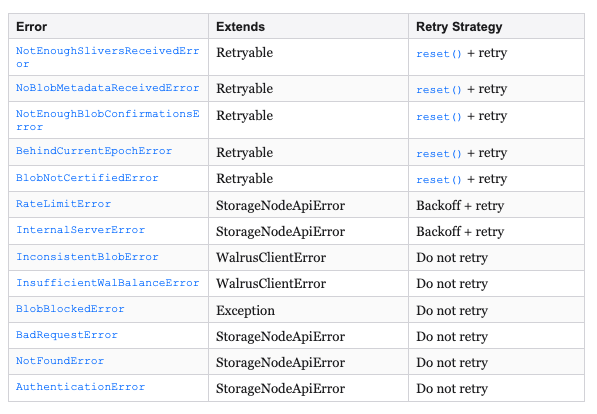
Dartus provides a typed error hierarchy with 18+ specific error classes. The most important concept: some errors are retryable.
Basic Pattern
try {
  final data = await client.readBlob(blobId: blobId);
} on BlobNotCertifiedError {
  print('Blob not yet certified - try again shortly');
} on NotEnoughSliversReceivedError {
  client.reset();
  final data = await client.readBlob(blobId: blobId);
} on BehindCurrentEpochError {
  client.reset();
  final data = await client.readBlob(blobId: blobId);
} on InsufficientWalBalanceError {
  print('Wallet needs more WAL tokens');
} on RateLimitError {
  print('Rate limited - back off and retry');
} on StorageNodeApiError catch (e) {
  print('Storage node error: $e');
} on WalrusClientError catch (e) {
  print('Client error: $e');
}
Note: Dartus has two parallel exception trees. WalrusClientError covers client-side issues (encoding, sliver decoding, epoch mismatches). StorageNodeApiError covers HTTP errors from storage nodes (rate limiting, auth failures, 500s). Your catch blocks should handle both.
Retryable vs. Non-Retryable
Using the Upload Relay
The upload relay is a middle ground: the server handles erasure coding (so you don’t need the Rust FFI library), but the user’s wallet pays the storage costs. This is ideal for dApps where you want users to own their storage but don’t want to ship native binaries.
final client = WalrusDirectClient.fromNetwork(
  network: WalrusNetwork.testnet,
  uploadRelay: UploadRelayConfig(
    host: 'https://upload-relay.testnet.walrus.space',
    maxTip: BigInt.from(1000),
  ),
);
The relay is transparent — you use the same writeBlob and writeFiles APIs. The SDK automatically routes encoding through the relay when the native library isn’t available.
On-Chain Operations
Dartus provides direct access to Walrus’s on-chain state on Sui.
List Blobs Owned by a Wallet
final blobs = await client.getOwnedBlobs(
  owner: walletAddress);
for (final blob in blobs) {
  print('Blob: ${blob['blobId']}');
}
Read and Write Blob Attributes
final attrs = await client.readBlobAttributes(
  blobObjectId: blobObjectId);

final tx = await client.writeBlobAttributesTransaction(
  blobObjectId: blobObjectId,
  attributes: {
    'contentType': 'image/png',
    'version': '2',
  },
);
Delete a Blob
// Only works if created with deletable: true
final tx = await client.deleteBlobTransaction(
  blobObjectId: blobObjectId);
Putting It All Together
Here’s a minimal Flutter screen that uploads an image and displays it from Walrus:
import 'package:flutter/material.dart';
import 'package:dartus/dartus.dart';
import 'dart:async';
import 'dart:io';
import 'dart:typed_data';
import 'package:image_picker/image_picker.dart';

class WalrusUploadScreen extends StatefulWidget {
  @override
  _WalrusUploadScreenState createState() =>
    _WalrusUploadScreenState();
}

class _WalrusUploadScreenState
    extends State<WalrusUploadScreen> {
  final client = WalrusClient(
    publisherBaseUrl: Uri.parse(
      'https://publisher.walrus-testnet.walrus.space'),
    aggregatorBaseUrl: Uri.parse(
      'https://aggregator.walrus-testnet.walrus.space'),
    useSecureConnection: true,
    logLevel: WalrusLogLevel.info,
  );

  String? _blobId;
  bool _uploading = false;
  Uint8List? _downloadedImage;

  Future<void> _pickAndUpload() async {
    final picker = ImagePicker();
    final picked = await picker.pickImage(
      source: ImageSource.gallery);
    if (picked == null) return;

    setState(() => _uploading = true);
    try {
      final bytes =
        await File(picked.path).readAsBytes();
      final response =
        await client.putBlob(data: bytes);
      final blobId =
        response['newlyCreated']
          ?['blobObject']?['blobId']
        ?? response['alreadyCertified']?['blobId'];

      setState(() {
        _blobId = blobId;
        _uploading = false;
      });
    } catch (e) {
      setState(() => _uploading = false);
      ScaffoldMessenger.of(context).showSnackBar(
        SnackBar(content: Text('Upload failed: $e')),
      );
    }
  }

  Future<void> _download() async {
    if (_blobId == null) return;
    try {
      final bytes = await client.getBlob(_blobId!);
      setState(() => _downloadedImage = bytes);
    } catch (e) {
      ScaffoldMessenger.of(context).showSnackBar(
        SnackBar(content: Text('Download failed: $e')),
      );
    }
  }

  @override
  void dispose() {
    unawaited(client.close());
    super.dispose();
  }

  @override
  Widget build(BuildContext context) {
    return Scaffold(
      appBar: AppBar(title: Text('Walrus + Flutter')),
      body: Padding(
        padding: EdgeInsets.all(16),
        child: Column(
          crossAxisAlignment:
            CrossAxisAlignment.stretch,
          children: [
            ElevatedButton(
              onPressed:
                _uploading ? null : _pickAndUpload,
              child: Text(_uploading
                ? 'Uploading...'
                : 'Pick & Upload Image'),
            ),
            if (_blobId != null) ...[
              SizedBox(height: 16),
              SelectableText('Blob ID: $_blobId'),
              SizedBox(height: 8),
              ElevatedButton(
                onPressed: _download,
                child: Text('Download from Walrus'),
              ),
            ],
            if (_downloadedImage != null) ...[
              SizedBox(height: 16),
              Expanded(child:
                Image.memory(_downloadedImage!)),
            ],
          ],
        ),
      ),
    );
  }
}
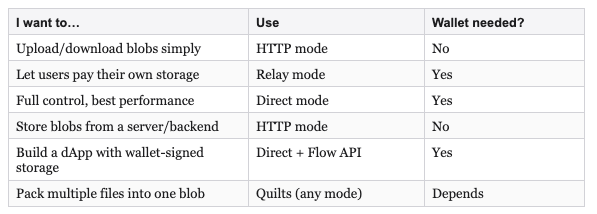
Quick Reference: Which Mode Should I Use?
What's Next?
- Dartus API Reference — Full generated docs for every class and method
- Dartus Demo App — Comprehensive Flutter app showcasing all SDK features
- Walrus Documentation — Protocol-level docs on erasure coding, epochs, tokenomics
- Walrus — Main Walrus site
- Dartus on pub.dev — Package page with changelog and versions
- GitHub Issues — Report bugs or request features