
Getting Started with walrus-python: Store and Retrieve Data on Walrus Using Python


Walrus is a decentralized blob storage protocol built on the Sui blockchain. If you're a Python developer, walrus-python gives you a native SDK to store, retrieve, and manage data on Walrus, no blockchain experience required.
This tutorial walks you through the full SDK: setting up a client, uploading your first blob, understanding Walrus's response format, retrieving data in multiple ways, handling large files with streams, and building production-ready error handling. By the end, you'll have a working Python script that stores and retrieves files on decentralized storage.
If you have questions as you’re going through it, join the Walrus Discord and post your question in the #developer channel.
What You'll Learn
- How to install and configure walrus-python
- Uploading blobs from bytes, files, and streams
- Understanding Walrus blob IDs vs. object IDs
- Retrieving blobs: in-memory, as files, as streams, and metadata-only
- Configuring storage duration, deletability, and object ownership
- Error handling patterns for production apps
- Building a practical file backup utility with Walrus
Prerequisites
- Python >= 3.8
- pip (or your preferred package manager)
- Basic familiarity with Python's
requestslibrary (helpful but not required)
No blockchain wallet, SUI tokens, or Sui experience needed. The SDK works through public publisher and aggregator HTTP endpoints — on testnet, storage is free.
Installation
pip install walrus-pythonThat's it. The only dependency is requests. No native binaries, no Rust FFI, no blockchain SDK. If you can pip install, you're ready.
Verify the install:
from walrus import WalrusClient, WalrusAPIError
print("walrus-python ready")
Setting Up The Client
To interact with Walrus, you need two endpoints:
- Publisher — accepts your data,
performs erasurecoding, distributes it across storage nodes, and handles the on-chain transaction. Think of it as the "write" endpoint. - Aggregator — reassembles your data from storage nodes when you request it. Think of it as the "read" endpoint.
Walrus provides free public endpoints for testnet:
from walrus import WalrusClient

client = WalrusClient(
    publisher_base_url="https://publisher.walrus-testnet.walrus.space",
    aggregator_base_url="https://aggregator.walrus-testnet.walrus.space",
)
The timeout parameter (default: 30 seconds) controls how long HTTP requests wait before raising an error. For large file uploads, you'll want to increase this:
# For uploading files >1MB, give it more room
client = WalrusClient(
    publisher_base_url="https://publisher.walrus-testnet.walrus.space",
    aggregator_base_url="https://aggregator.walrus-testnet.walrus.space",
    timeout=120,
)
Testnet vs. Mainnet: The Walrus mainnet is live (launched March 2025). The examples in this tutorial use testnet, which is free. For production, you'd swap in mainnet publisher/aggregator URLs; see the Walrus documentation for the current list of public services.
Your First Upload
Let's store some bytes on decentralized storage:
from walrus import WalrusClient

client = WalrusClient(
    publisher_base_url="https://publisher.walrus-testnet.walrus.space",
    aggregator_base_url="https://aggregator.walrus-testnet.walrus.space",
)

data = b"Hello from Python on Walrus!"
response = client.put_blob(data=data)
print(response)
Run this and you'll get back a JSON response that looks something like:
{
  "newlyCreated": {
    "blobObject": {
      "id": "0x1a2b3c...",
      "blobId": "Abc123...",
      "size": 28,
      "encodingType": "RedStuff",
      ...
    },
    "cost": {
      "storageCost": 1000000,
      ...
    }
  }
}
Your data is now stored across a decentralized network of storage nodes. No account, no API key, no S3 bucket configuration. Let's break down what just happened.
Understanding the Response
The upload response tells you everything you need to retrieve your data later. There are two key identifiers:
Blob ID (blobId) - A content-addressed identifier derived from the data itself. The same bytes will always produce the same blob ID, regardless of who uploads them or when. This is what you'll use most often to retrieve data.
Object ID (id) — A Sui blockchain object representing the storage resource. This is unique per upload — even if you upload identical data twice, each upload creates a distinct Sui object. Use this when you need to reference a specific storage transaction.
The response also tells you whether the blob was newly created or was already on the network:
response = client.put_blob(data=b"Hello from Python on Walrus!")

if "newlyCreated" in response:
    blob_obj = response["newlyCreated"]["blobObject"]
    print(f"New blob stored!")
    print(f"  Blob ID:   {blob_obj['blobId']}")
    print(f"  Object ID: {blob_obj['id']}")
elif "alreadyCertified" in response:
    blob_obj = response["alreadyCertified"]["blobObject"]
    print(f"Blob already exists on the network.")
    print(f"  Blob ID:   {blob_obj['blobId']}")
This deduplication is a core Walrus feature: if the exact same bytes exist on the network, you don't pay to store them again. The alreadyCertified response confirms the data is available and gives you the blob ID to read it.
Reading Blobs
Now let's retrieve data. The SDK gives you four ways to read, depending on what you need.
By Blob ID (most common)
Returns the raw bytes in memory:
blob_id = "Abc123..."  # from your upload response

content = client.get_blob(blob_id)
print(content)  # b"Hello from Python on Walrus!"
By Object ID
Same result, different lookup key. Useful when you've stored the Sui object reference rather than the blob ID:
object_id = "0x1a2b3c..."  # from your upload response

content = client.get_blob_by_object_id(object_id)
print(content)
Save Directly to a File
For larger blobs, skip holding the entire thing in memory:
client.get_blob_as_file(blob_id, "downloaded_image.jpg")
print("Saved to downloaded_image.jpg")
This streams the data in 8KB chunks internally, so memory usage stays constant regardless of blob size.
As a Stream
For maximum control, pipe the data wherever you need it:
stream = client.get_blob_as_stream(blob_id)

with open("output.bin", "wb") as f:
    f.write(stream.read())
This returns a file-like object (the raw urllib3 response), so you can integrate it with anything that accepts a stream.
Metadata Only
Check if a blob exists and inspect its headers without downloading the content:
metadata = client.get_blob_metadata(blob_id)
print(metadata)
# {'content-length': '28', 'content-type': 'application/octet-stream', 'etag': 'Abc123...', ...}
The etag header matches the blob ID — a quick way to verify integrity. The metadata call uses an HTTP HEAD request, so it's very lightweight.
Uploading Files
Uploading from a file path is a one-liner:
response = client.put_blob_from_file("photo.jpg")

blob_id = response["newlyCreated"]["blobObject"]["blobId"]
print(f"Stored photo.jpg as blob: {blob_id}")
Under the hood, put_blob_from_file reads the entire file into memory and sends it. This is fine for files up to a few dozen megabytes. For anything larger, use the stream approach in Part 7.
The method raises FileNotFoundError if the path doesn't exist, so you can handle it naturally:
try:
    response = client.put_blob_from_file("missing.txt")
except FileNotFoundError:
    print("File doesn't exist!")
Stream Uploads
For large files or data you're pulling from another source (an HTTP download, a database export, a subprocess pipe), you can upload directly from a stream without loading everything into memory:
import requests as http_requests
from walrus import WalrusClient

client = WalrusClient(
    publisher_base_url="https://publisher.walrus-testnet.walrus.space",
    aggregator_base_url="https://aggregator.walrus-testnet.walrus.space",
    timeout=120,
)

# Stream a file from the web directly into Walrus
url = "https://example.com/large-dataset.csv"
with http_requests.get(url, stream=True) as r:
    result = client.put_blob_from_stream(r.raw)
    print(result)
You can also use BytesIO for in-memory streams — useful in testing or when you're assembling data dynamically:
from io import BytesIO

buffer = BytesIO()
buffer.write(b"dynamically assembled data...")
buffer.seek(0)  # rewind before uploading

response = client.put_blob_from_stream(buffer)
Important: Always seek(0) on a BytesIO before uploading. If the position is at the end of the buffer, the SDK will upload zero bytes.
Upload Options
Every upload method (put_blob, put_blob_from_file, put_blob_from_stream) accepts the same optional parameters:
epochs - Storage Duration
Controls how long your blob stays on the network. Each epoch is a fixed time period defined by the Walrus protocol. The default is 1 (one epoch ahead of the current one).
# Store for 5 epochs
response = client.put_blob(data=b"keep this longer", epochs=5)
Higher epoch counts cost more but keep your data available longer.
deletable - Mutable Storage
By default, blobs are permanent — once stored, they exist until their epochs expire. Set deletable=True to create a blob you can remove early:
response = client.put_blob(data=b"temporary data", deletable=True)Deletable blobs are useful for staging data, draft content, or anything you might need to remove before its storage period ends.
send_object_to - Transfer Ownership
Sends the resulting Sui blob object to a specific address. Useful when building applications where the user (not the publisher) should own the storage resource:
response = client.put_blob(
    data=b"user's data",
    send_object_to="0xUSER_SUI_ADDRESS..."
)
encoding_type - Encoding Format
Specifies the encoding scheme. In practice, you rarely need to set this — the default (RedStuff) is what you want.
response = client.put_blob(
    data=payload,
    epochs=3,
    deletable=True,
    send_object_to="0x9f8e7d..."
)
Error Handling
The SDK raises WalrusAPIError for any API-level failure, with structured fields you can inspect:
from walrus import WalrusClient, WalrusAPIError

client = WalrusClient(
    publisher_base_url="https://publisher.walrus-testnet.walrus.space",
    aggregator_base_url="https://aggregator.walrus-testnet.walrus.space",
)

try:
    client.get_blob("nonexistent-blob-id")
except WalrusAPIError as e:
    print(f"Code:    {e.code}")       # 404
    print(f"Status:  {e.status}")     # "NOT_FOUND"
    print(f"Message: {e.message}")    # "Blob not found"
    print(f"Details: {e.details}")    # []
WalrusAPIError is a subclass of requests.exceptions.RequestException, so if you already have a broad except RequestException handler in your code, it'll catch Walrus errors too.
For network-level failures (timeouts, DNS resolution, connection refused), the SDK wraps them in WalrusAPIError with a 500 code:
bad_client = WalrusClient(
    publisher_base_url="https://nonexistent.example.com",
    aggregator_base_url="https://nonexistent.example.com",
)

try:
    bad_client.get_blob("some-id")
except WalrusAPIError as e:
    print(e.code)    # 500
    print(e.status)  # "REQUEST_FAILED"
Production Pattern
Here's how you'd wrap Walrus operations in a production context:
import logging
from walrus import WalrusClient, WalrusAPIError

logger = logging.getLogger(__name__)

def store_blob(client: WalrusClient, data: bytes, retries: int = 3) -> str:
    """Store a blob and return its blob ID, with retries."""
    for attempt in range(1, retries + 1):
        try:
            response = client.put_blob(data=data, deletable=True)

            if "newlyCreated" in response:
                blob_id = response["newlyCreated"]["blobObject"]["blobId"]
            elif "alreadyCertified" in response:
                blob_id = response["alreadyCertified"]["blobObject"]["blobId"]
            else:
                raise ValueError(f"Unexpected response format: {response}")

            logger.info(f"Stored blob {blob_id} on attempt {attempt}")
            return blob_id

        except WalrusAPIError as e:
            logger.warning(f"Attempt {attempt} failed: {e}")
            if attempt == retries:
                raise

    raise RuntimeError("Unreachable")
Putting It Together — A File Backup Script
Let's build something real: a script that backs up a directory to Walrus and saves a manifest so you can restore later.
"""backup_to_walrus.py — Back up a directory to Walrus decentralized storage."""

import json
import os
import sys
from datetime import datetime, timezone
from walrus import WalrusClient, WalrusAPIError


def backup_directory(directory: str, client: WalrusClient) -> dict:
    """Walk a directory, upload each file, return a manifest."""
    manifest = {
        "backup_timestamp": datetime.now(timezone.utc).isoformat(),
        "source_directory": os.path.abspath(directory),
        "files": [],
    }

    for root, _, files in os.walk(directory):
        for filename in files:
            filepath = os.path.join(root, filename)
            relative_path = os.path.relpath(filepath, directory)
            file_size = os.path.getsize(filepath)

            print(f"  Uploading {relative_path} ({file_size:,} bytes)...", end=" ")

            try:
                response = client.put_blob_from_file(filepath, epochs=5)

                if "newlyCreated" in response:
                    blob_obj = response["newlyCreated"]["blobObject"]
                    status = "new"
                elif "alreadyCertified" in response:
                    blob_obj = response["alreadyCertified"]["blobObject"]
                    status = "deduplicated"
                else:
                    print("UNKNOWN RESPONSE")
                    continue

                manifest["files"].append({
                    "path": relative_path,
                    "blob_id": blob_obj["blobId"],
                    "object_id": blob_obj.get("id", ""),
                    "size": file_size,
                    "status": status,
                })
                print(f"OK ({status})")

            except WalrusAPIError as e:
                print(f"FAILED ({e})")
                manifest["files"].append({
                    "path": relative_path,
                    "error": str(e),
                    "size": file_size,
                })

    return manifest


def restore_from_manifest(manifest_path: str, output_dir: str, client: WalrusClient):
    """Restore files from a Walrus backup manifest."""
    with open(manifest_path) as f:
        manifest = json.load(f)

    print(f"Restoring {len(manifest['files'])} files to {output_dir}/")

    for entry in manifest["files"]:
        if "error" in entry:
            print(f"  Skipping {entry['path']} (failed during backup)")
            continue

        output_path = os.path.join(output_dir, entry["path"])
        os.makedirs(os.path.dirname(output_path), exist_ok=True)

        print(f"  Downloading {entry['path']}...", end=" ")
        try:
            client.get_blob_as_file(entry["blob_id"], output_path)
            print("OK")
        except WalrusAPIError as e:
            print(f"FAILED ({e})")


if __name__ == "__main__":
    client = WalrusClient(
        publisher_base_url="https://publisher.walrus-testnet.walrus.space",
        aggregator_base_url="https://aggregator.walrus-testnet.walrus.space",
        timeout=120,
    )

    if len(sys.argv) < 3:
        print("Usage:")
        print("  python backup_to_walrus.py backup <directory>")
        print("  python backup_to_walrus.py restore <manifest.json> <output_dir>")
        sys.exit(1)

    command = sys.argv[1]

    if command == "backup":
        directory = sys.argv[2]
        print(f"Backing up {directory} to Walrus...")
        manifest = backup_directory(directory, client)

        manifest_path = f"walrus_backup_{datetime.now(timezone.utc).strftime('%Y%m%d_%H%M%S')}.json"
        with open(manifest_path, "w") as f:
            json.dump(manifest, f, indent=2)

        succeeded = sum(1 for f in manifest["files"] if "blob_id" in f)
        failed = sum(1 for f in manifest["files"] if "error" in f)
        print(f"\nDone. {succeeded} files backed up, {failed} failed.")
        print(f"Manifest saved to {manifest_path}")

    elif command == "restore":
        manifest_path = sys.argv[2]
        output_dir = sys.argv[3] if len(sys.argv) > 3 else "restored"
        restore_from_manifest(manifest_path, output_dir, client)
        print("\nRestore complete.")
Run it:
# Back up a directory
python backup_to_walrus.py backup ./my-project

# Restore from the manifest
python backup_to_walrus.py restore walrus_backup_20260414_120000.json ./restored
This demonstrates the full SDK surface in a realistic context: file uploads, error handling, blob retrieval to files, and the newlyCreated / alreadyCertified response pattern.
Quick Reference: SDK Methods
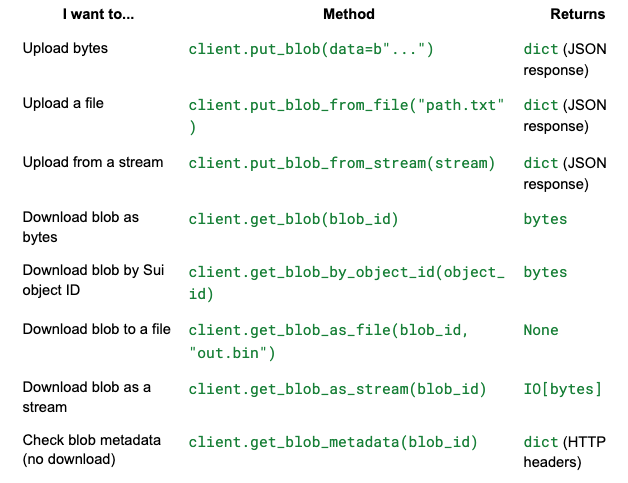
All upload methods accept these optional parameters: encoding_type, epochs, deletable, send_object_to.
What’s next?
- walrus-python on PyPI — Package page with version history
- GitHub Repository — Source code, issues, and contributions
- Walrus Documentation — Protocol-level docs covering erasure coding, epochs, tokenomics
- Walrus HTTP API Spec — Interactive API docs served by any aggregator
- Awesome Walrus — Community-curated tools, libraries, and apps